GuidesAugust 9, 2026
The Organic Renewal-Season Calendar: Every Deadline From October to April
Read More
Your annual update is due between January 1 and April 1, depending on your certifier. Log the season on your phone as you go, in English or Spanish. From what you entered, Trazo prepares the records section, a draft change summary for your annual update, the acreage and Common OSP workbooks and your inspection packet, and lists what changed in your records since you last wrote your plan. You review and sign. Your certifier's other requirements are yours to supply. The bigger gain is next season: log as you go, and your next inspection starts from records you already have. The same records also produce a page your buyer can scan.
Starter plan free permanently · No credit card · Log a whole season, unlimited · Export your records anytime
Built for certified-organic orchards and berry growers who sell wholesale · Renewal packet, inspection exports and the certifier review link: $249/yr per farm
Organic recordkeeping is not a year-round chore with no end. It is a handful of deadlines you either walk into prepared or scramble to meet.
Renewal packets and annual-update forms go out
CCOF renewal packages arrive in early November (November 3 in 2025). Oregon Tilth posts renewal forms at the start of November, and for OTCO the renewal application is the OSP update.
OCCSP application deadline
The USDA Organic Certification Cost Share Program reimburses up to 75% of your certification costs, capped at $750 per scope. The July 2026 rule put the 2025 and 2026 program years (fees paid October 1, 2024 through September 30, 2026) on the same December 31, 2026 deadline, so two years can be claimed at once. Same day COG Pro stops service.
Annual updates are due
CCOF January 1 · Oregon Tilth January 1 or April 1 (assigned by Tilth) · PCO January 15 · OEFFA February 15 · NOFA-NY February 28 · WSDA March 1.
Inspection season
Inspections happen when your fields can be observed. Whatever you did not write down during the season is what you will be reconstructing from memory.
In 2026 the USDA posted a Common Organic System Plan — a standard OSP template set that certifiers may adopt. It is optional, and whether your certifier uses it is their decision, so ask them. If they do, Trazo generates its § 11 records section and the four required attachment forms as Excel workbooks, filled in from the events you logged. You review, correct and sign them — you are the author of your plan, not us.
Dates are as published by each certifier and can differ for your operation — confirm yours with your certifier.
One spray record from an organic walnut block: the entry, and the two documents it produced. Nothing here was re-typed.
Entered once, on a phone, at the edge of the block. Everything on both documents below comes from this entry and your farm profile, including the per-acre rate Trazo works out from the amount and the block size.
Rate, area, target pest, re-entry and pre-harvest intervals, buffer distance, EPA registration, supplier invoice, with the CFR sections cited.
One page of a family: the OSP renewal packet, whole-operation dossier, and California PUR export are built from the same records. Reviewing as a certifier? →
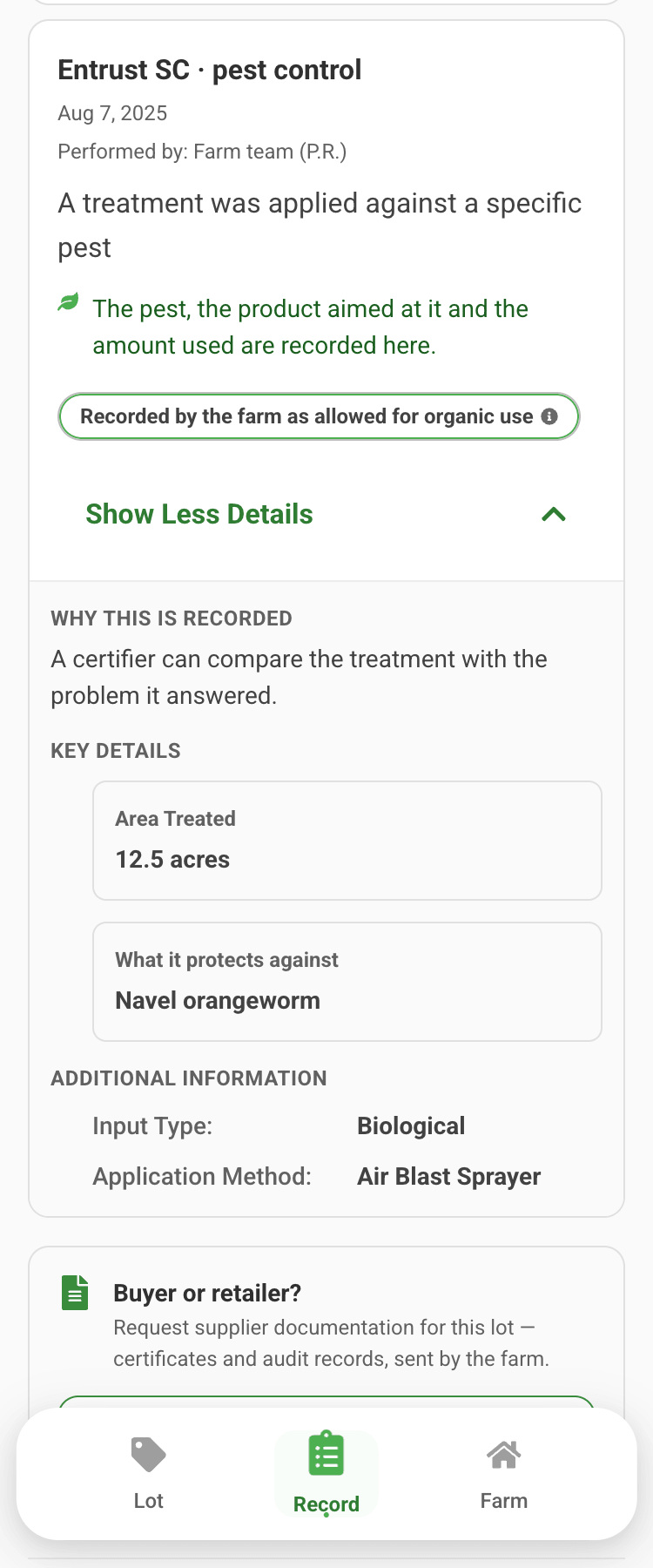
What was applied, what it protects against, and the organic basis the farm recorded for it. That basis is the farm's record, not an approval of this application. No login, no acronyms to look up.
Your worker’s name and licence number, the EPA registration, the re-entry window, who you buy from: a certifier is entitled to all of it. A shopper is not. Trazo removes these before the public page is built, so they are never sent to a browser.
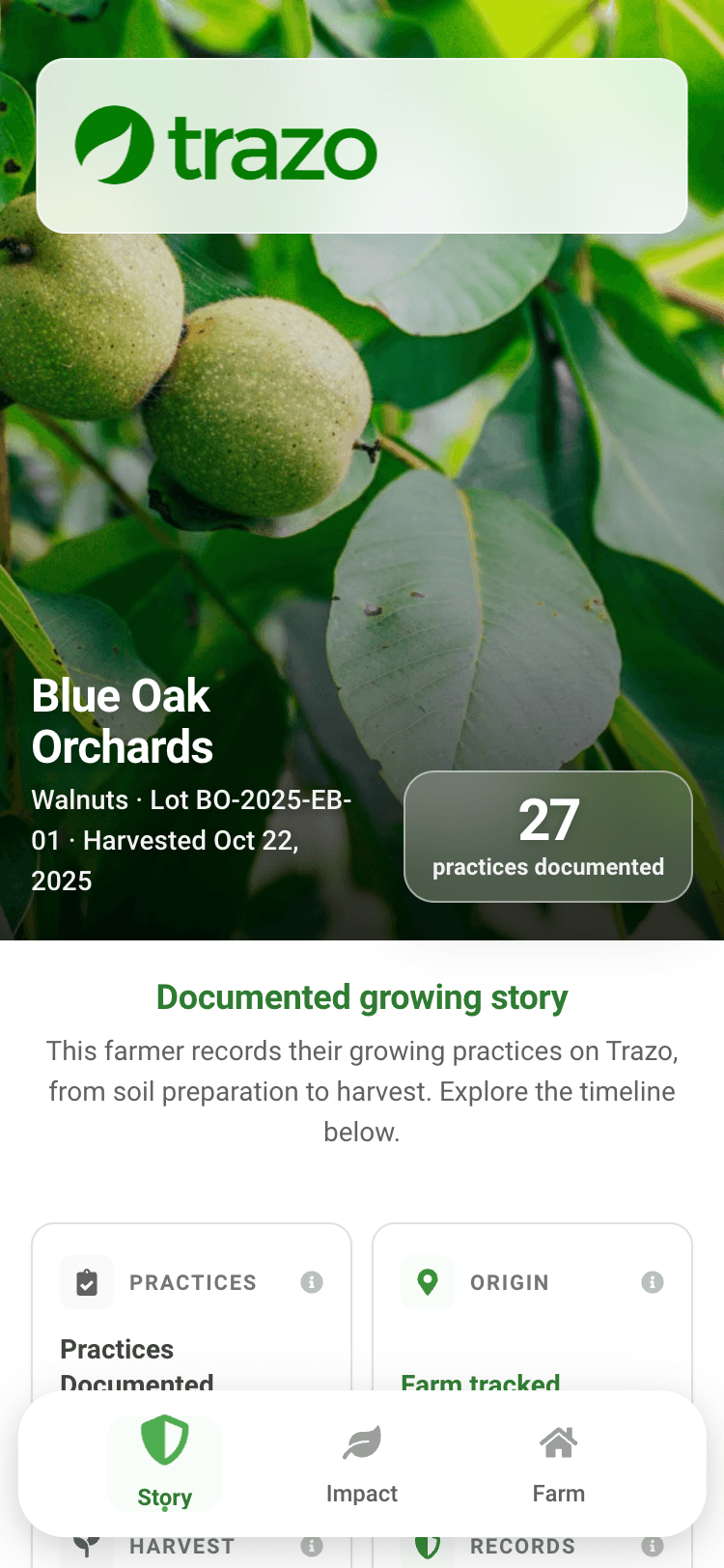
The record above is one row on this page. A buyer scanning the tag on the carton lands here: the farm, the lot, the harvest date, and every practice you documented across the season — counted, not graded. Trazo does not grade your farm, and no self-assigned rating appears anywhere a buyer can see.
The same page estimates the season’s emissions: fuel, equipment and irrigation energy on the farm, plus the manufacturing of the fertilizer and chemicals applied. It is written the way a buyer can hold it: what growing a kilogram of the crop produced, and the same figure as miles driven in an average car. Transport, packaging and retail sit outside that boundary, and the page says so beside the number.
A season goes public only when you finish it and confirm — clear that box and nothing publishes. One switch on your Buyer Page turns a published season off again, any time, and an unpublished season stops answering, whoever is holding the code.
Download the QR image, or a letter-size sheet of eight lot tags — farm, crop, lot ID, harvest date and the code — and put them on the cartons or bins, the way § 205.307 asks nonretail containers to be identified. Each finished season has its own lot, so the tag matches what is in the box.
What a published page shows is set by one policy, identical for every farm: no farm can hide a field or a recorded activity from a season it publishes. Your choice is the season: publish it whole, or keep it private, reversibly. The page shows what the farm recorded for that lot, not everything that happened, and the same rules apply on every Trazo page.
A wholesale buyer deciding in June does not wait for October. On the Compliance plan you can send them a private, read-only link to the season in progress — it shows exactly what the public page would show, under the same one-policy rules, never more. You can revoke it at any time, and every open is logged so you know whether they actually looked.
A buyer sees the farm, its city and its state. Your street address, ZIP and coordinates are stripped before the page is built, and a parcel added today publishes an approximate location — a point rounded to about a kilometer, with no field boundary and the zoom capped so it cannot be pushed in closer.
Screenshots are unmodified output from Trazo, using sample farm data. Organic status shown is the status recorded for the input; Trazo does not certify farms.
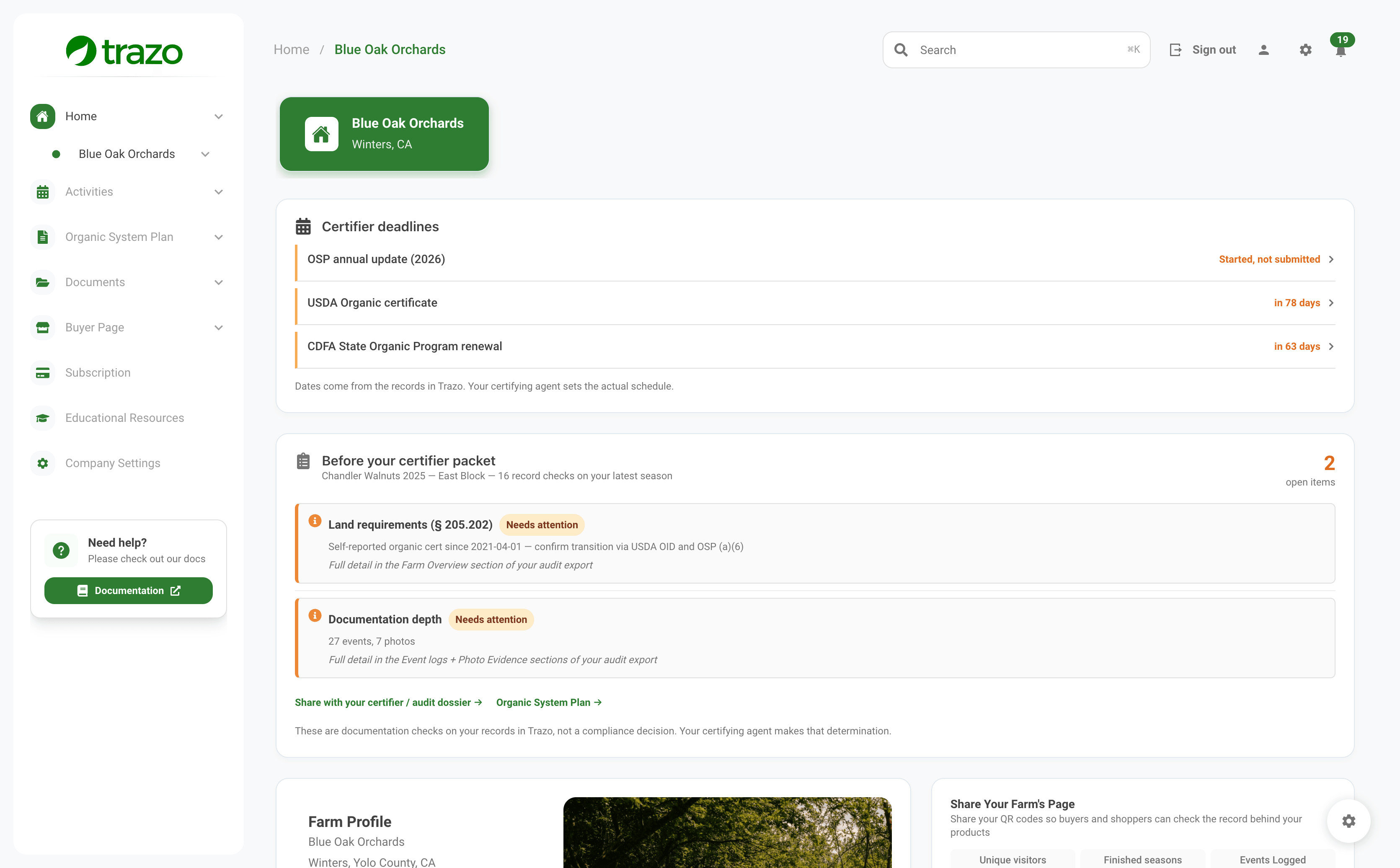
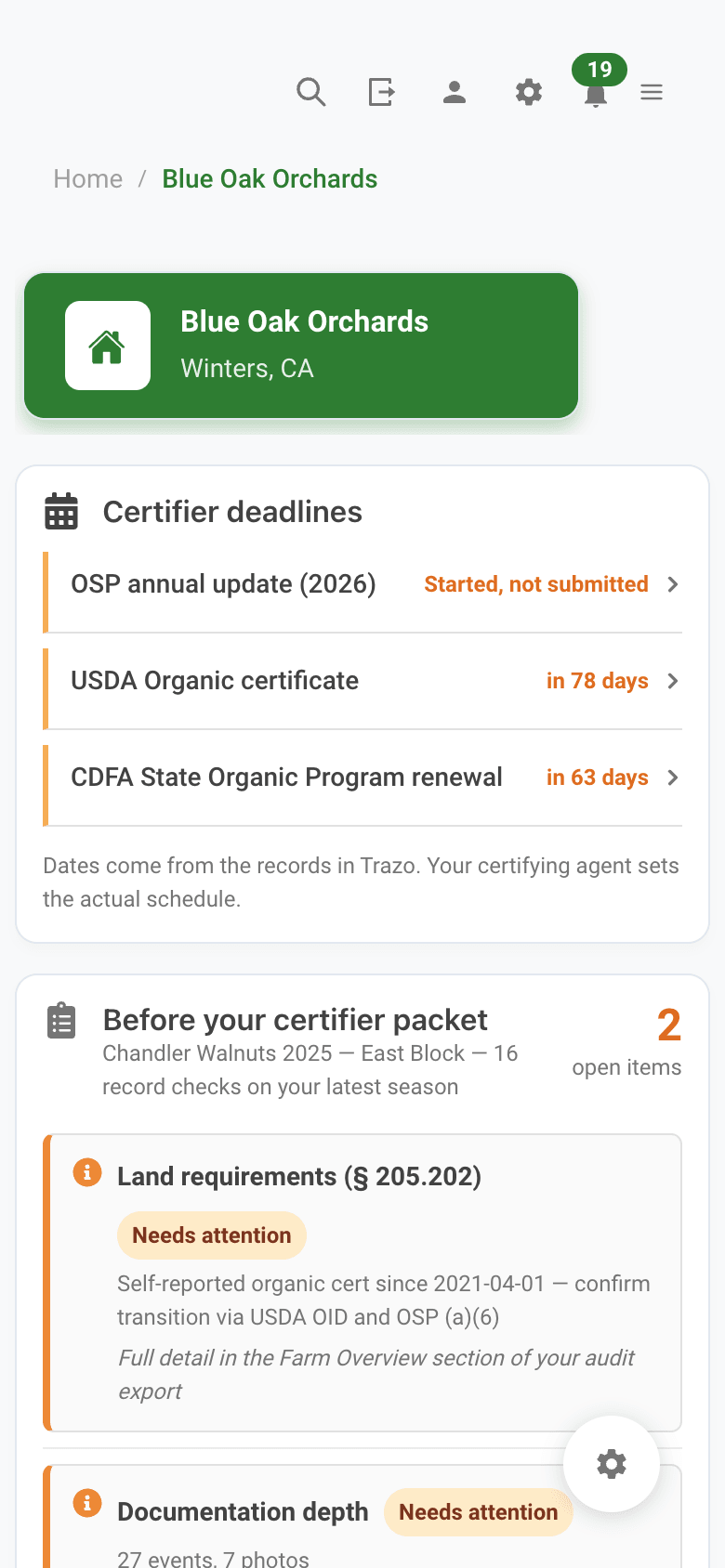
Every renewal starts from last year’s answers, and every tool copies them across. A plan that still says “six parcels” when the seventh was leased in January reads, to a certifier, like a plan nobody re-read. Trazo lists what your records did after each answer was written — so the plan you send describes the farm you run.
Ground you began managing
A new lease or purchase needs a parcel application, land history and affidavits before it carries a certified crop.
Productions started and closed
The rotation paragraph in your plan still says what you intended; the seasons say what you grew.
§ 205.400(f) notices you filed
A change you already told the certifier about, that the plan has not caught up with — and when a notice names a field, it prints on that field's application.
Materials added or removed
Every input on your plan's materials list that was not there when the materials module was last answered.
Affidavits and contamination incidents
Signed land-history or adjoining-land attestations, and any drift or commingling event recorded on a parcel.
Parcels the plan never names
A plain check: a field whose name appears nowhere in the plan's text.
Modules not revisited in a year
Answered eighteen months ago is not wrong — but it is the first thing a reviewer notices.
The review is compiled from dated records only — it does not read your prose and it never says an answer is wrong. You may well have re-read a section and decided it still holds, so it never blocks the Submit button. It sits under your plan on the screen, prints on the first page of your renewal packet, and on an active plan it is the running list of what next year’s annual update will have to mention. You remain the author of your plan (7 CFR 205.201(a)); this is the page that keeps you from filing a stale one.
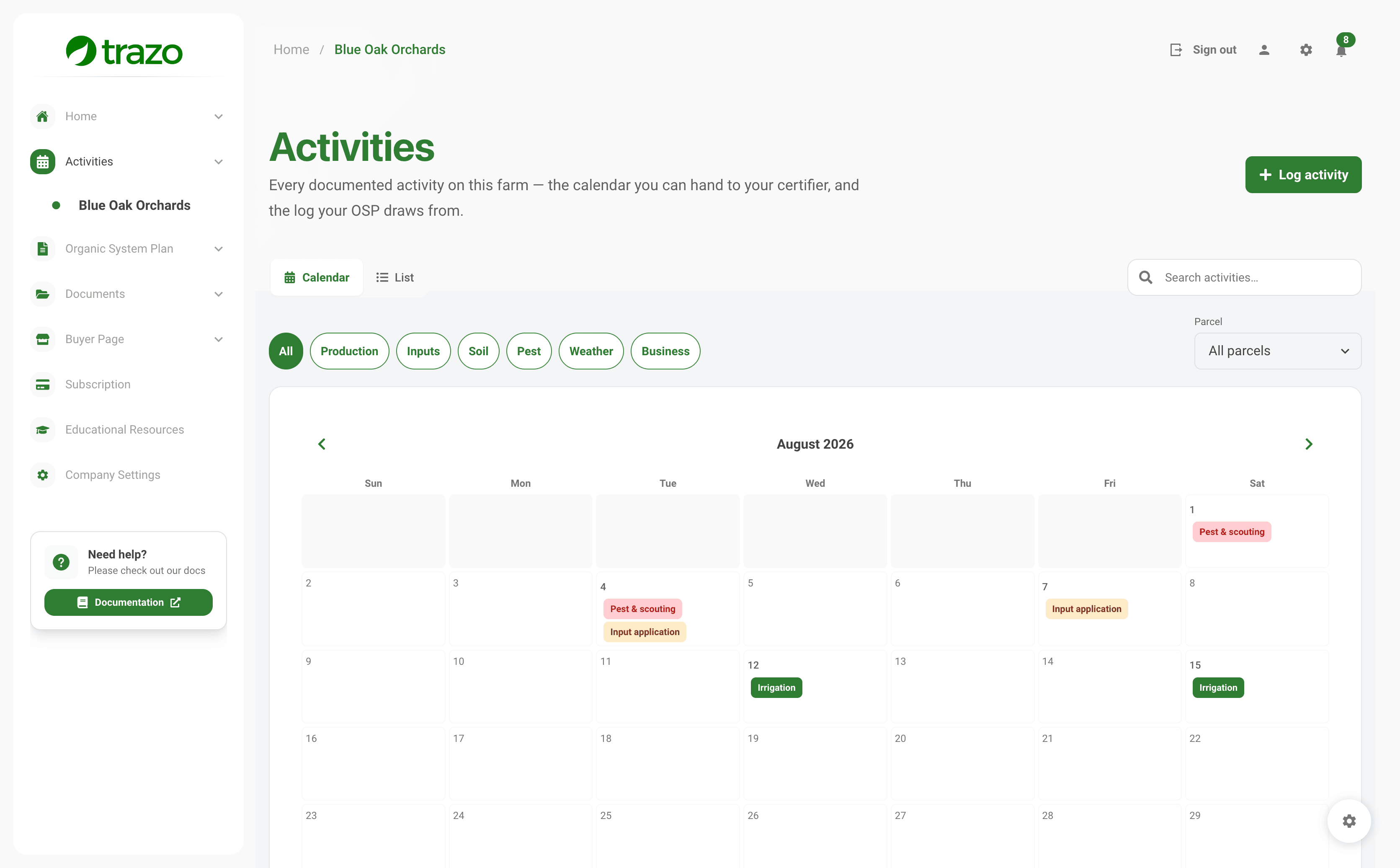
Three screens, one chain: the season you logged, the plan your answers compile into, and the paperwork that comes out. Real app, on a fictional 27.9-acre organic walnut operation (demo data).
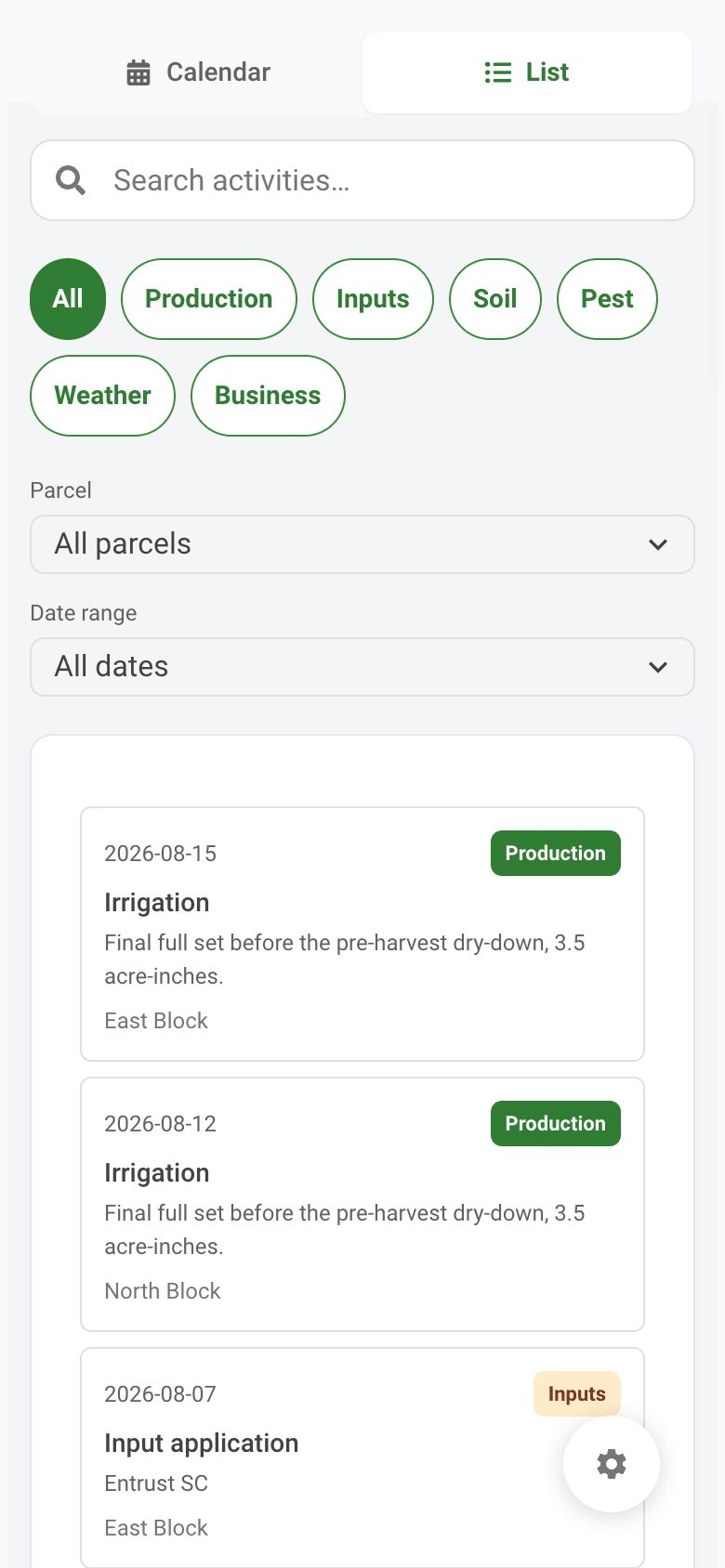
Irrigation, input applications, scouting and harvest land on the calendar the day the work happens — colour-coded by type, filterable by block, and switchable to a list. Logged from the phone in the cab, in English or Spanish.
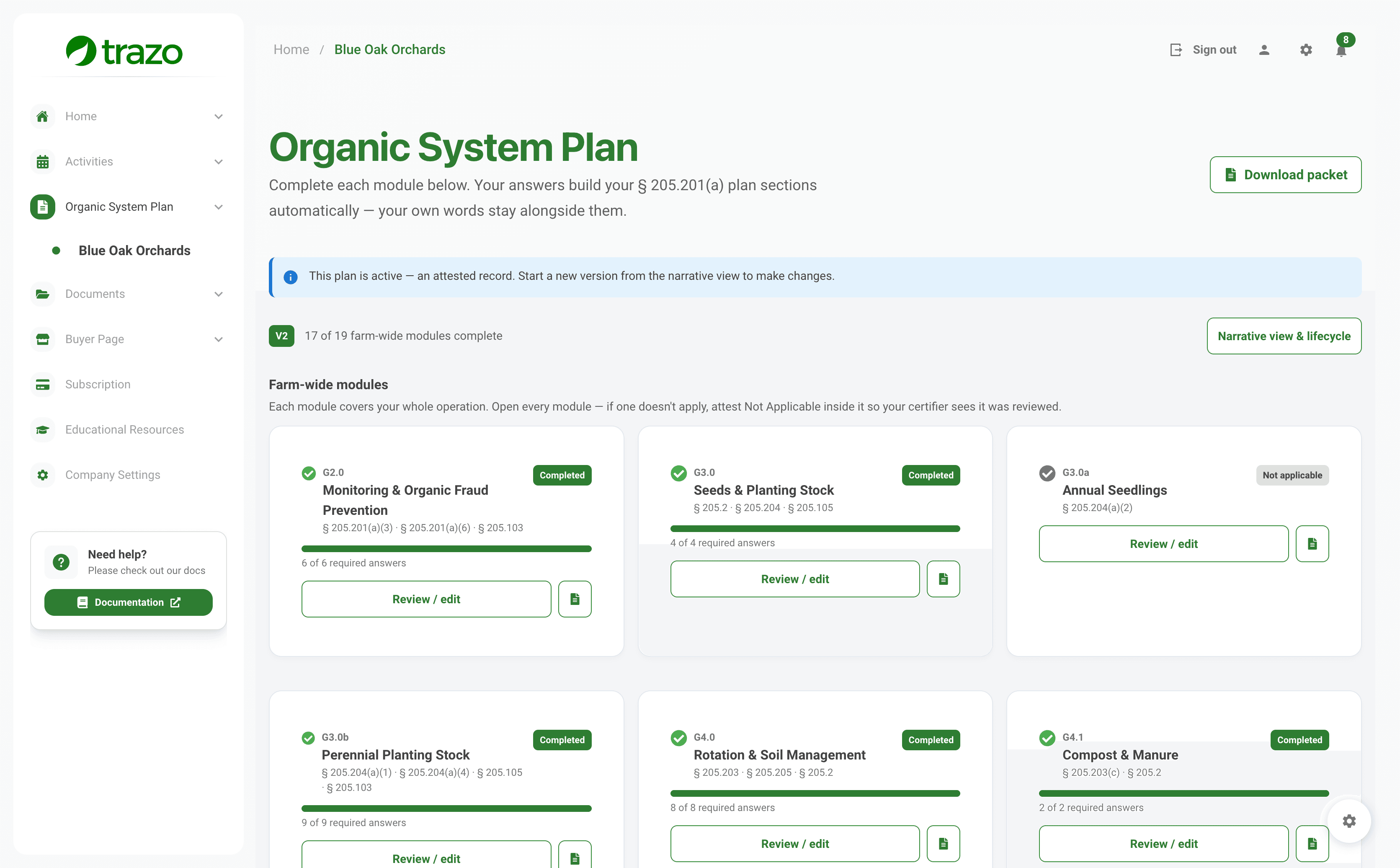
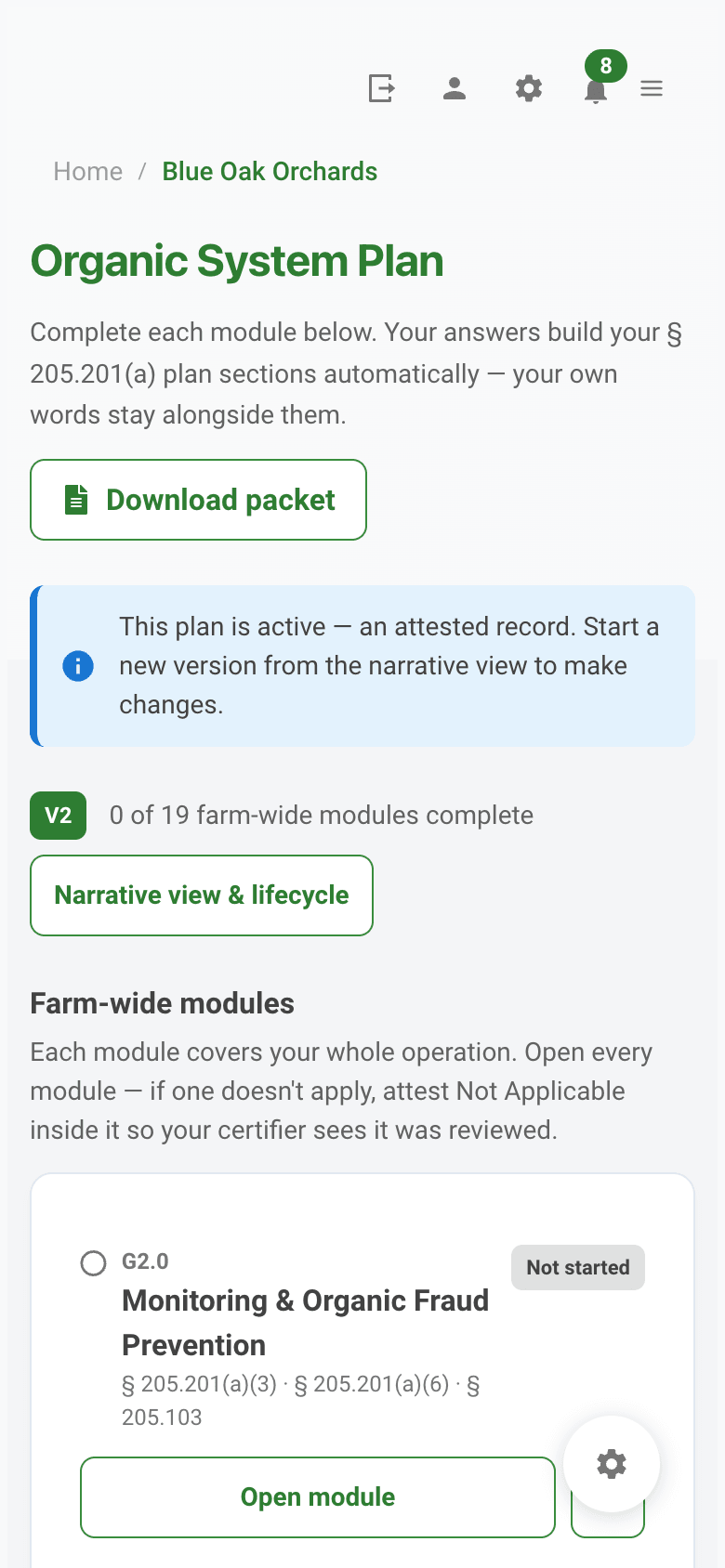
Answer each module once and your answers compile into the plan sections — your own words kept alongside them. Every card carries the CFR sections it answers to, and a module that does not apply is attested Not applicable rather than left blank.
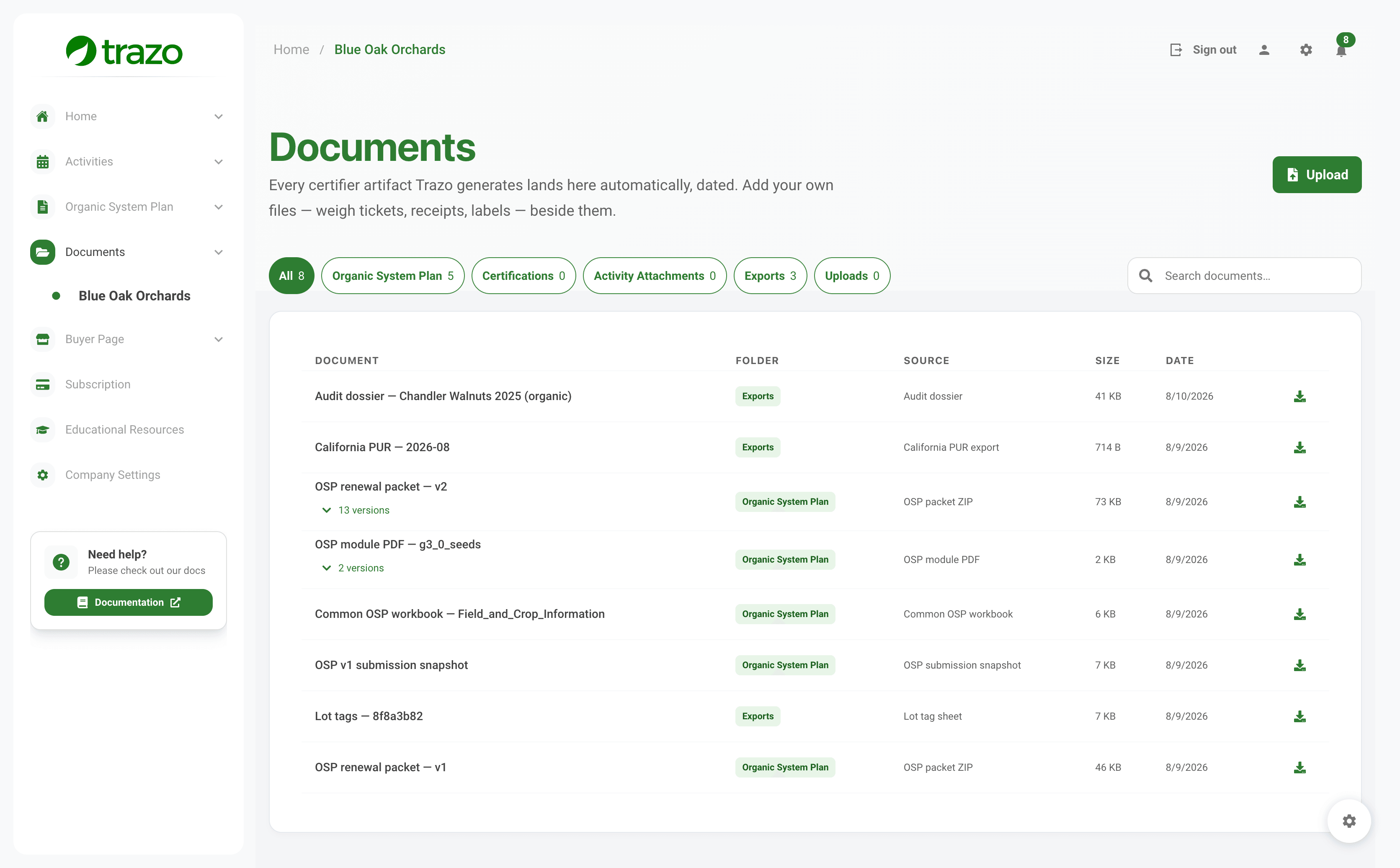
The audit dossier, the OSP renewal packet and its module PDFs, the Common OSP workbooks, the California PUR export, lot tags — each one built from the records above, filed the moment it is generated. Your own weigh tickets and receipts sit beside them, and a receipt linked to a purchase record travels inside the packet itself.
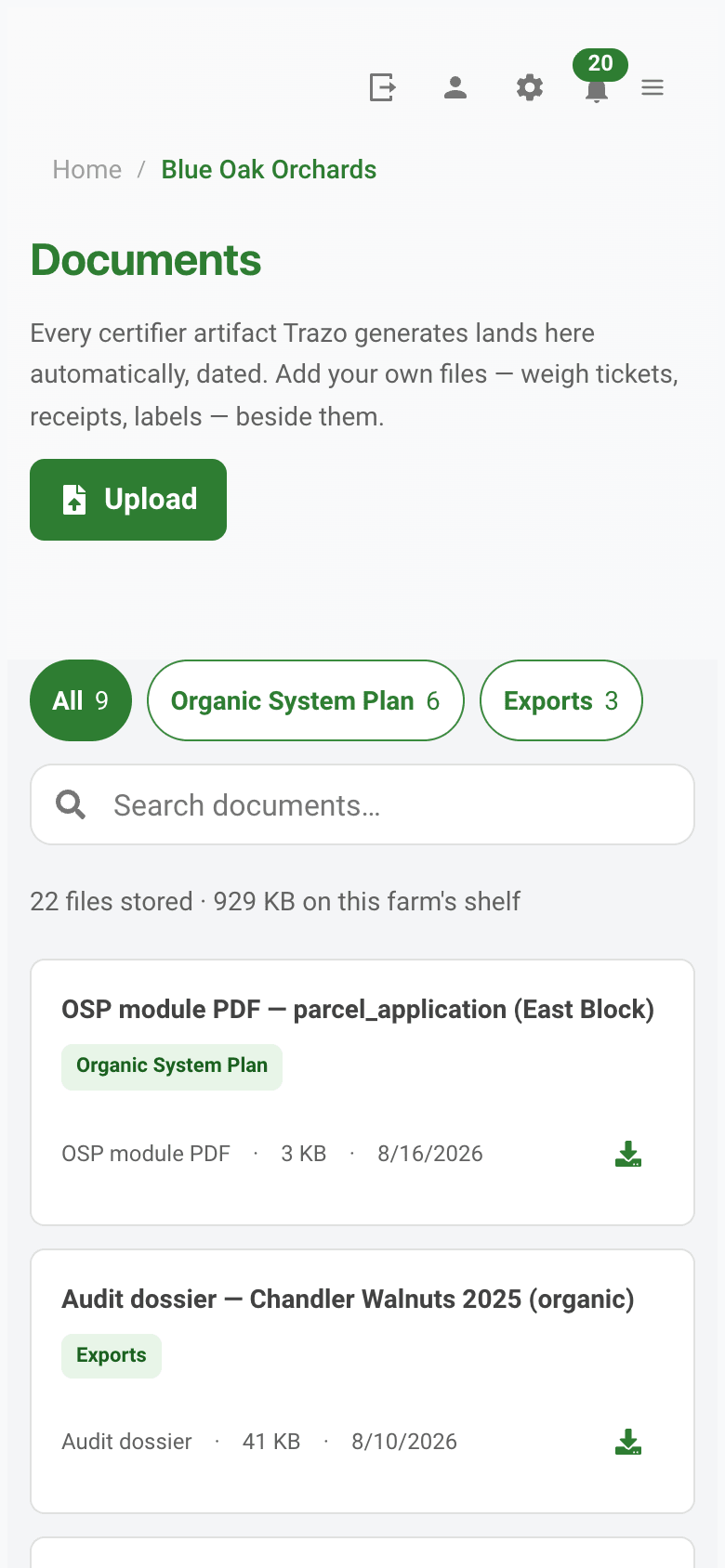
Screenshots are unmodified output from Trazo, using sample farm data. Record checks are documentation checks on what you entered, not a compliance decision — your certifying agent makes that determination.
For Organic Farms
Designed to meet NOP recordkeeping requirements (7 CFR 205.103). The records you already keep become documentation you can hand to your inspector.
Every input you log is checked against the National List (7 CFR 205.601–.602) the moment you save it, and recorded with the basis you give it: OMRI Listed, WSDA Listed, NOP seal on the label, your record of your certifier's written approval, or entered by you with no third-party listing, which is exactly how compost, manure and a home-formulated spray reach the list your certifier asks for. A name Trazo cannot match is reported as unmatched, never as unapproved. Once your plan is active, an input that is not on the materials list on your plan is flagged on the spot, with the OMRI search a click away.
Each lot shows what you harvested against what you sold, with the balance printed, and links the sale back to the field, the picks and the inputs you logged. That is the trail an inspector follows at the in/out audit.
Per-parcel crop, rotation and input history across seasons — the years you typed at setup plus every year compiled from the seasons you logged, inputs included, each one marked as to where it came from. Always ready when your certifier asks.
Document your Organic Fraud Prevention Plan including supplier verification, supply-chain risk assessment, and review cadence. Required under USDA's Strengthening Organic Enforcement final rule (88 FR 3548, January 19, 2023; compliance required since March 19, 2024), 7 CFR 205.201(a)(3).
Document commercial availability searches for organic seed (NOP 5029). Record suppliers contacted, dates, and availability determinations, all in one place for certifier review.
Log shared-equipment cleaning events with timestamps, methods, and photos. Document contamination prevention for split operations or rented equipment.
A finished season cannot be deleted for five years after it closed or after its latest record was added, whichever is later: the NOP retention period at 7 CFR 205.103(b)(4). A season still open can be deleted by the farm.
Certification is a snapshot. Trazo is the continuous record.
How It Works

Create your account in minutes. Add your farm, parcels, and start your first production. No technical setup required.

Log every farming event fast with voice recording, photo capture, or simple forms. Trazo flags record details still missing while you can still remember them.
Your records become the records section of your renewal packet and your audit exports, and Trazo shows them next to your Organic System Plan answers for you to check. Before you file, Trazo lists what changed in your records since you last wrote those answers, so you catch anything stale before your certifier does. You review and sign; your certifier's other requirements are yours to supply. When you finish a harvest, Trazo can build a buyer page from the same season. Publishing it is optional and reversible: one switch turns a season on, the same switch turns it off.
Why Trazo
Trazo turns every farming practice into a documented digital record, so your inspection prep is ready and buyers can see how your crop was actually grown.
1 entry
Feeds Your Renewal Packet and Audit Exports
$249 flat
Per Farm, Per Year, Not Revenue-Banded
EN + ES
Crew Logs in Spanish, You File in English
33
US Crop Templates
Add your farm and log today's work. The Starter plan is free permanently — no card, no expiry.
Questions & Answers
Resources & Insights